

MakerWorld → Bambuddy, one click.
Pick the plates, pick the folder, hit import. Print profiles land straight in your self-hosted Bambuddy library — from Chrome or Firefox.
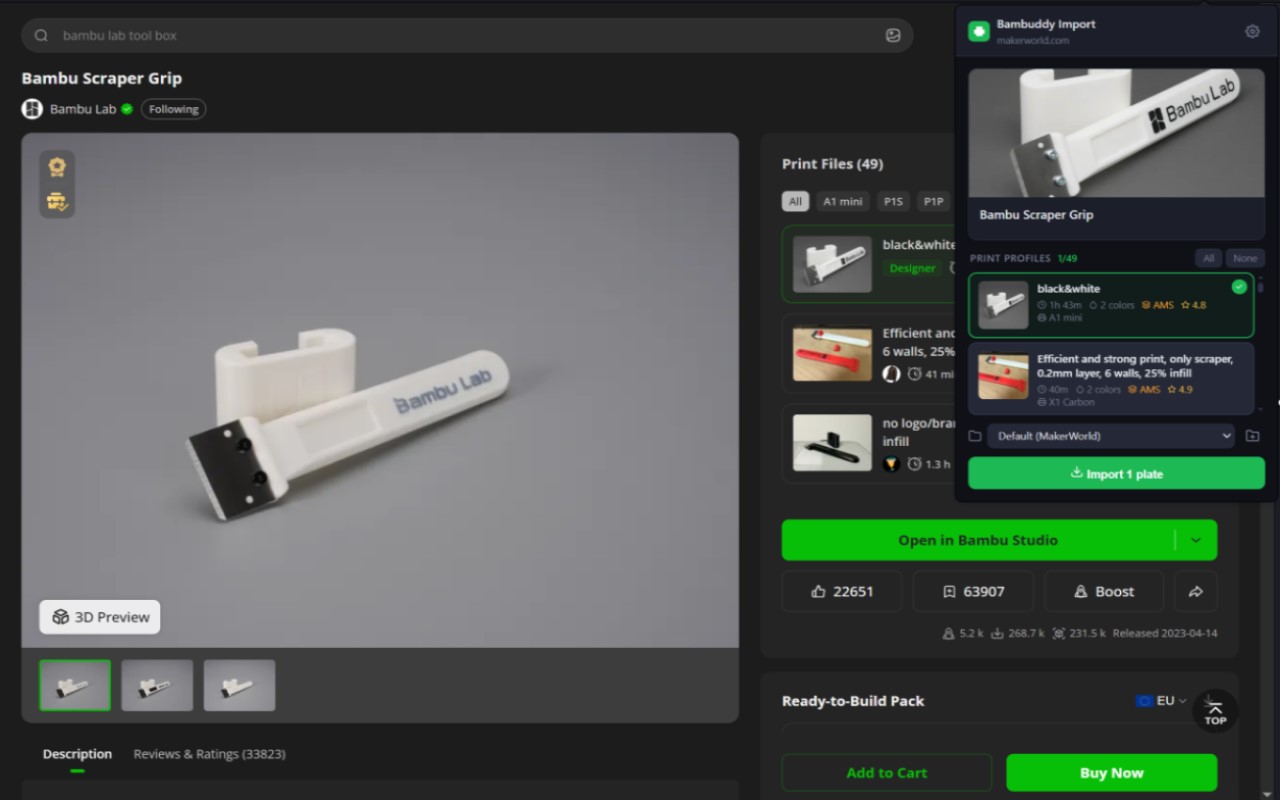
What it does
Everything Bambuddy's own MakerWorld import does, without leaving the model page.
Pick any plates
One profile, a handful, or all of them. Each card shows print time, colours, AMS and rating so you know what you're grabbing.
Choose the folder
Your whole library tree in a dropdown, last choice remembered. Create a new folder right from the popup.
Runs in the background
Close the popup, keep browsing. Imports continue in the extension's worker; the badge counts down and a notification tells you when it's done.
Opens instantly
Models are resolved the moment the page loads and cached, and thumbnails come down at 200 px instead of full size.
Your server only
No backend, no telemetry. The extension talks to the Bambuddy URL you configure and to the MakerWorld page you're on — nothing else.
Open source
Plain MV3 JavaScript, no build step, MIT licensed. One codebase for Chrome and Firefox.
Setup
Two minutes, once.
Create an API key in Bambuddy
Settings → API Keys → Create API Key. Enable Manage Library and Allow cloud access, and make sure a Bambu Cloud account is linked under Settings → Bambu Cloud.
Point the extension at your server
Click the toolbar icon → gear. Enter your Bambuddy URL (e.g. http://192.168.1.100:8000) and paste the key. The browser asks once for permission to reach that origin — that's the only site the extension ever gets access to besides makerworld.com.
Import from any model page
Open a model on makerworld.com — the icon shows a green ↓. Click it, select plates, pick a folder, Import. "Open in Bambuddy" takes you to the folder afterwards.
Full documentation, troubleshooting and the changelog live in the README on GitHub. Issues and ideas: issue tracker.